관련 포스팅
Ghostty

설치
GitHub - mkasberg/ghostty-ubuntu: Ubuntu/Debian (.deb) packages for Ghostty
Ubuntu/Debian (.deb) packages for Ghostty. Contribute to mkasberg/ghostty-ubuntu development by creating an account on GitHub.
github.com
/bin/bash -c "$(curl -fsSL https://raw.githubusercontent.com/mkasberg/ghostty-ubuntu/HEAD/install.sh)"
설정
`~/.config/ghostty/config` 파일을 수정하면 된다.
사용할 수 있는 옵션은 https://ghostty.org/docs/config/reference 에서 확인할 수 있다.
keybinding
기본 keybinding 리스트는 아래 명령어로 확인할 수 있으며, 새로운 키 조합을 추가하고자 한다면 config 파일에 keybind를 정의하면 된다.
ghostty +list-keybinds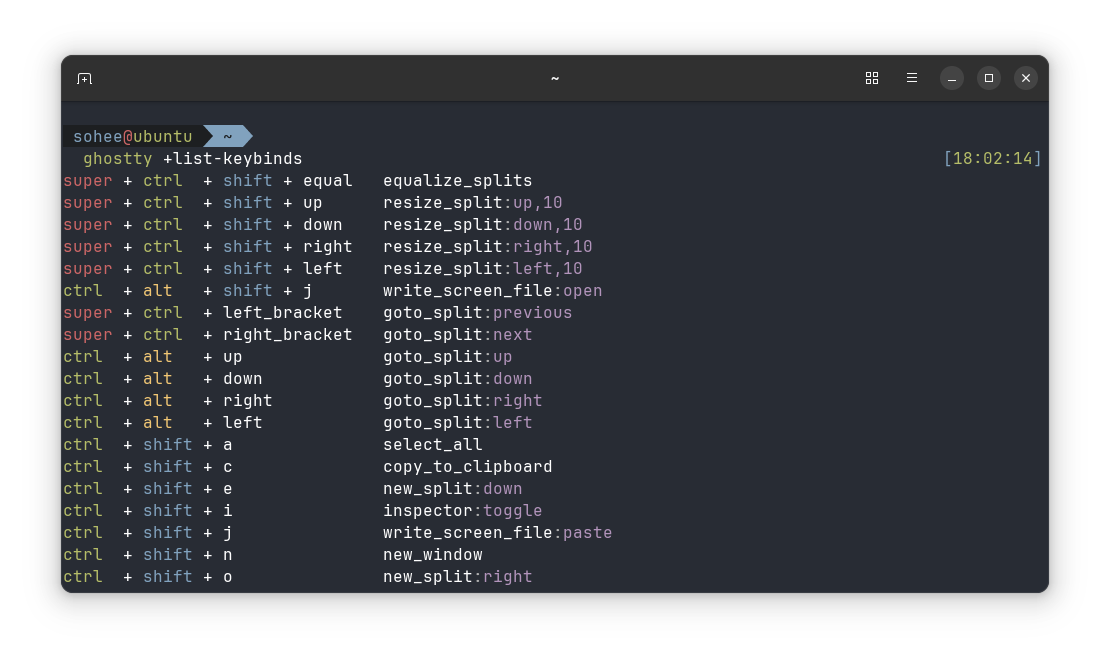
결론
Wezterm은 한글 변환이 잘 안 되고 키 바인딩이 내 환경에서 잘 적용되지 않았다. config 설정도 복잡하다고 생각이 든다.
반면 Ghostty는 설치만 해도 기본적인 키 바인딩이나 tmux 설정이 되어있기 때문에 편하다고 생각한다. 한글 변환도 잘 된다.
일단 Ghostty를 사용하다가 불만이 생기면 `Alacritty + Zellij` 조합으로 다시 돌아갈 생각이다.
참고
Ghostty 터미널 에뮬레이터 설치 및 간단 사용기
현지시각으로 2024.12.26일 한국시간으로는 27일 아침에 세간의 관심을 끌어왔던 새로운 terminal emulator인 Ghostty 가 1년 이상의 closed beta를 마치고 마침내 대중에 공개되었습니다. 현재 공식적으로
elsainmac.tistory.com
'Setting > Ubuntu' 카테고리의 다른 글
| Ubuntu에 카카오톡 설치하기 (근데 이제 Wine을 곁들인) (0) | 2025.03.14 |
|---|---|
| Windows에서 VMWare로 Ubuntu 22.04 설치하기 (0) | 2025.03.12 |
| 터미널 에뮬리에터 WezTerm 설치 (0) | 2025.03.11 |
| 터미널 에뮬레이터 비교 (Ghostty, WezTerm, Kitty, Alacritty, Foot, Warp) (2) | 2025.03.05 |
| 멀티 부팅 환경에서 시간 동기화 문제 해결 (0) | 2025.03.05 |